
Demarking Markdown : Simplifying Text Formatting for the Web
Introduction
Markdown is now one of the world's most popular markup languages. Created by John Gruber in 2004 , it is a lightweight markup language that can be used to format a plain text document.
What is Markdown?
Markdown is a lightweight markup language. It is different than that of all the other text editors. For example, in MS Word, there are several buttons available to format an article but markdown contains special syntaxes for editing your text, which you have to add inline while writing your text. A markdown formatted file is created using markdown. Markdown formatting elements can be added to a plaintext file using a text editor application. There are also various applications & websites for markdown, Dillinger, is one of those. Markdown is commonly used for formatting text on the web, especially in documentation, README files, forums, and messaging platforms as it offers key features like simplicity, readability, and portability.
Markdown syntax is designed to be readable and unobtrusive, so the text in Markdown files can be read even if it isn't rendered.
— Gruber
How does Markdown work?
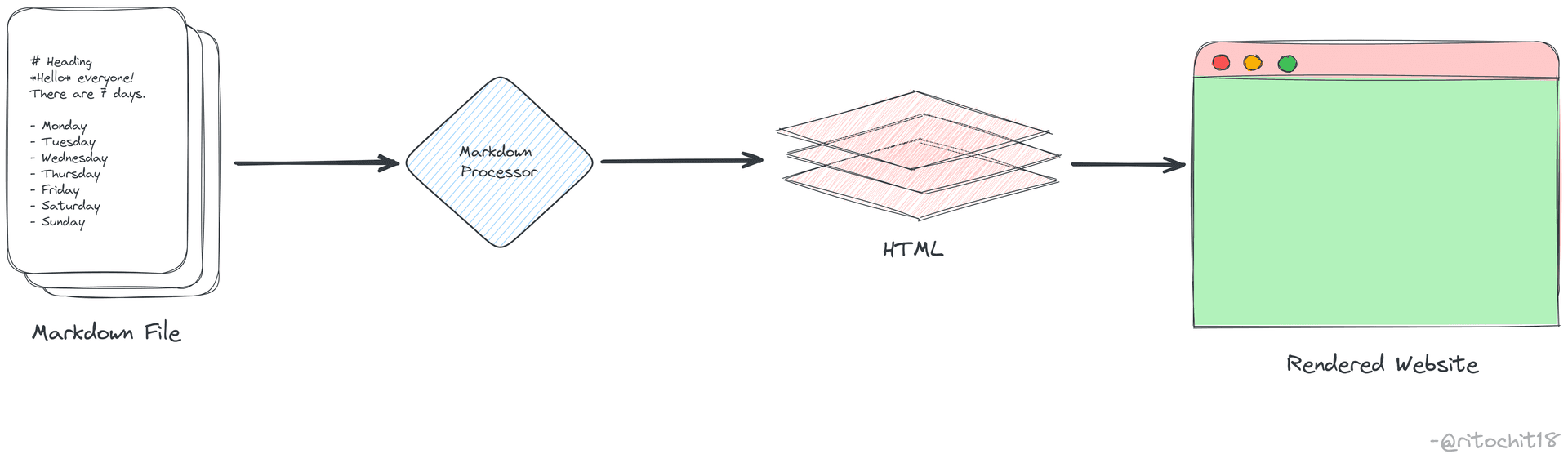
When you write a markdown formatted file the text is stored as a plaintext file having .md or .markdown extension. The markdown processor then takes the .md file as an input and outputs it to HTML format. Thus, a markdown processor (referred to as a 'parser') is capable of converting Markdown-formatted text to HTML so it can be displayed in web browsers.
Here is a detailed diagram explaining the process:
Where to use?
There are several use cases/ applications of markdown, viz.,
- Websites - Markdown was designed specially, for the web, so it's usual to have plenty of applications specifically designed for creating website content.
- Documents - Markdown is enough for creating basic documents like assignments and letters. Also markdown formatted files can be exported as PDF or HTML file format.
- Notes - Markdown is a super effective way to take notes as you can edit your notes alongside writing it, you don't have to raise your hand from the keyboard once you get accustomed to it.
- Books - Several websites where you can write in markdown and then export the file as PDF or any other file format.
- Documentation - Markdown is a natural fit for technical documentation. It can be used in writing technical blogs in technical platforms like Hashnode, and Dev Society,(as I am writing it in markdown). And also be used to create official documentation of several products, Readme files.
Basic Syntax
Basic Syntax
Headings
# Heading 1## Heading 2### Heading 3
Formatting
**Bold Text***Italic Text****Bold and Italic***
Lists
Ordered List:
1. First item2. Second item3. Third item
Unordered List:
- First item- Second item- Third item
Code Blocks
function sayHello() {console.log("Hello, World!");}
Links & Images
[Google](https://www.google.com)
Extended Syntax
Task List
- [x] Completed- [ ] Pending
Strikethrough
~~Strikethrough~~
Tables
| Header | Column ||--------|--------|| Data1 | Data2 |
Conclusion
Markdown offers a simple yet powerful way to format your text for the web and various digital platforms. Its lightweight syntax allows users to focus on content without worrying about formatting tools. Hope you find this guide useful!